
The true value of MarTech in 2026 is not only the data a tool can output, but what you can actually do with the data in practice.
Imagine hopping on a Zoom call and being prepared with your account's buying propensity with human-readable reasoning explaining it. You know the name of the engineer who configured SSO last week, the VP who viewed pricing twice, and someone from security who joined the workspace on Monday. You read it in about four seconds and lead the call with the security playbook.
Trailspark ingests your first party signals from your entire ecosystem, from marketing to product events, evaluates your accounts and writes the results into your CRM as native properties. But the reasoning data isn't just a "nice to know"... it's designed to help sales reps take the right next step when working their accounts.
Set it up once, then it pays out throughout the entire workflow: the ten minutes before a call, the call itself, and the follow-up. Here's how to set it up.
"There's no shortage of data in modern B2B tech stacks. The job is making it easy for your reps to find when they need it, and know how to interpret it."
Step 1: Send Trailspark your signals
Nothing gets evaluated until Trailspark can see what people are doing. Anything that can make an HTTP request can send signals, and most teams pull from some mix of:
- Product usage - The timeline of events straight from your app. Every time a feature is used, onboarding milestones, collaboration, API usage thresholds, subscription changes. In a PLG motion this is the good stuff, and it's the source most scoring tools never do anything meaningful with
- Marketing automation - Marketo, HubSpot workflows, or any platform with outbound webhooks. Form fills, email engagement, webinar attendance, and page visits
- Your CRM - HubSpot or Salesforce contact and account properties for added context about the account's current lifecycle stage or motion
You don't have to standardize any of it first. Each source sends data in its own shape, and Trailspark's mapping layer normalizes everything into one unified signal stream. Your product team's events and your marketing team's webhooks feed the same evaluation without anyone rewriting their instrumentation to match a spec.
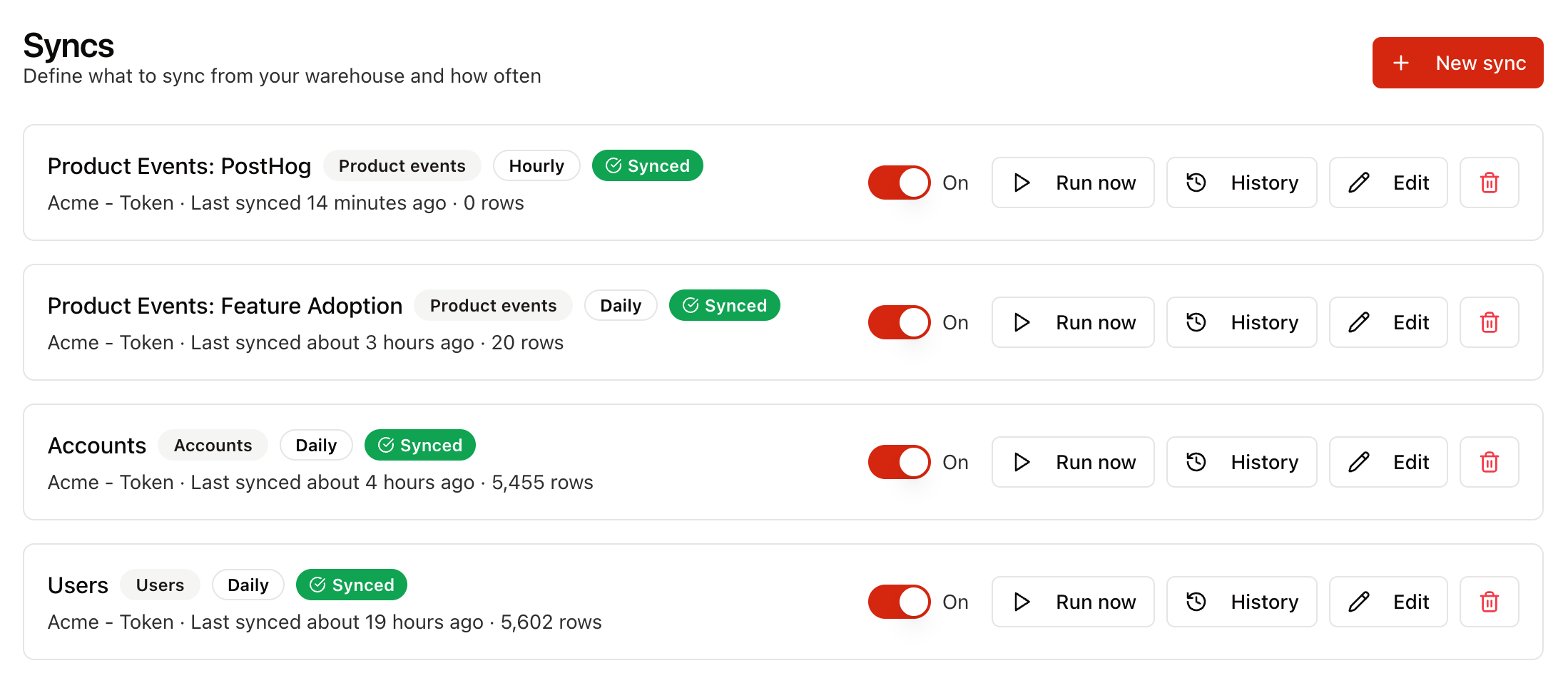
Identity resolution then runs on its own, tying every fragment to the right person and account. That includes product users who never spoke to sales, and anonymous visitors whose earlier activity attaches retroactively once they identify themselves.
Enrichment is optional and works behind the scenes. Connect your own Clay or Reo.dev account and it fills in company details your CRM doesn't cover. It only adds detail to accounts you already track, and your CRM's values always win a conflict.
Step 2: Describe the accounts you want to hear about
This step is important; it shapes everything downstream, so give it some real thought.
In Trailspark, an ideal-customer definition is a plain-language description where you describe what a good account looks like in plain English, the way you'd explain it to someone joining your sales or marketing team. SparkSense can help draft your acquisition definition from your closed-won deals directly from your CRM. There are no weights to assign and no point values to defend in a spreadsheet, so the definition stays readable by the people who actually know the answer (and can be easily updated as the business shifts).
Write one description per motion
Here's where the setup starts paying off.
A trial account and a renewal account have different litmus tests. "Are these people going to buy" and "are these people going to stay" read from the same source data but mean different things depending on where the account is at in their lifecycle. A drop in weekly active users means something mild during a trial and something urgent sixty days before an enterprise renewal.
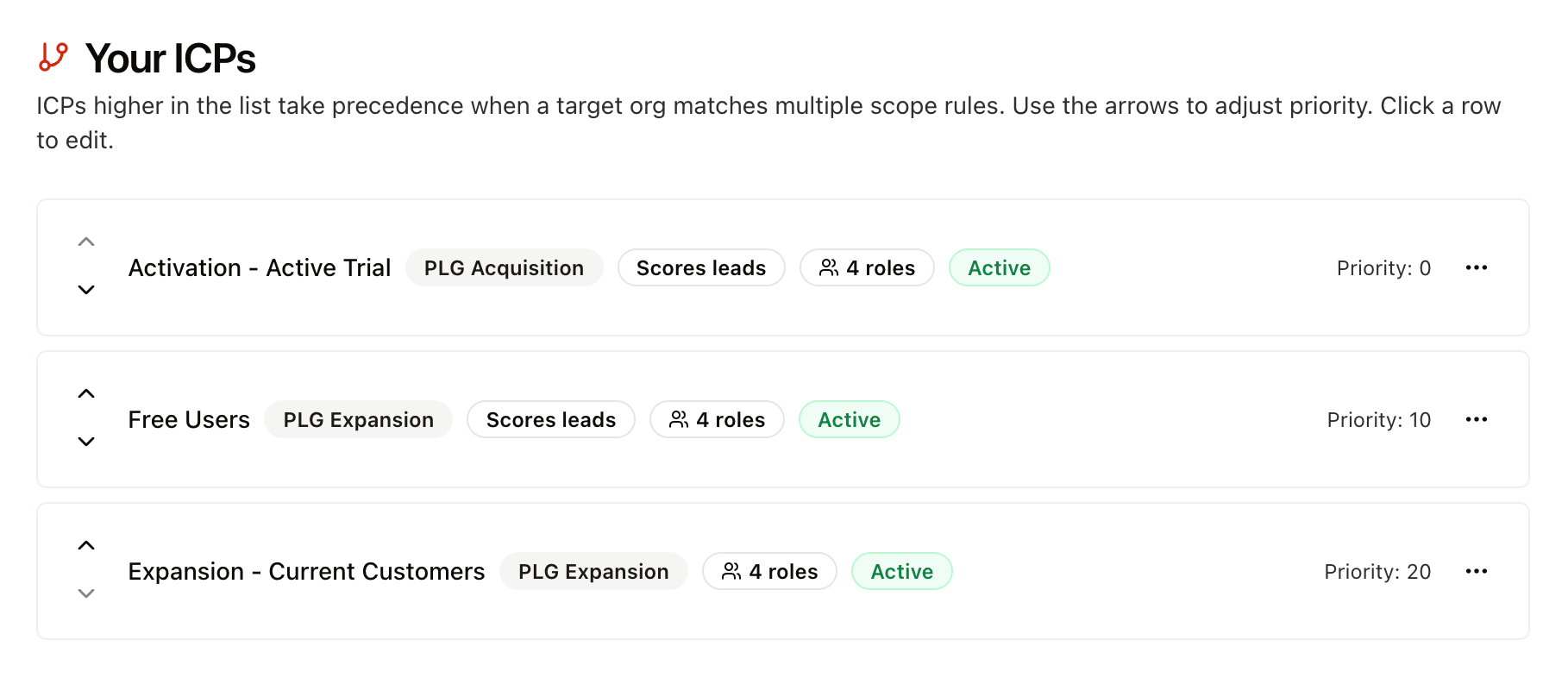
Similarly, an SMB account using 100 widgets can read differently than an enterprise account using 100 widgets. Context matters when looking at product data and Trailspark allows you to create as many ICP definitions as you want.
Most teams start with new business, expansion, and renewal, then add lenses over time for things like enterprise vs self-serve, or paid vs free-plan accounts. Each description carries its own rules about which accounts it applies to and its own idea of who belongs in the buying group. An account is evaluated under the lens matching the motion it's in right now, and it moves between lenses as it moves through its lifecycle.
That last part is what makes this genuinely useful rather than merely populated. A rep on a renewal call sees a renewal read, graded against renewal criteria, with renewal roles. A rep on a trial call sees something else entirely from the same underlying activity.
A quick way to pressure-test a description
Step 3: Map the results into your CRM
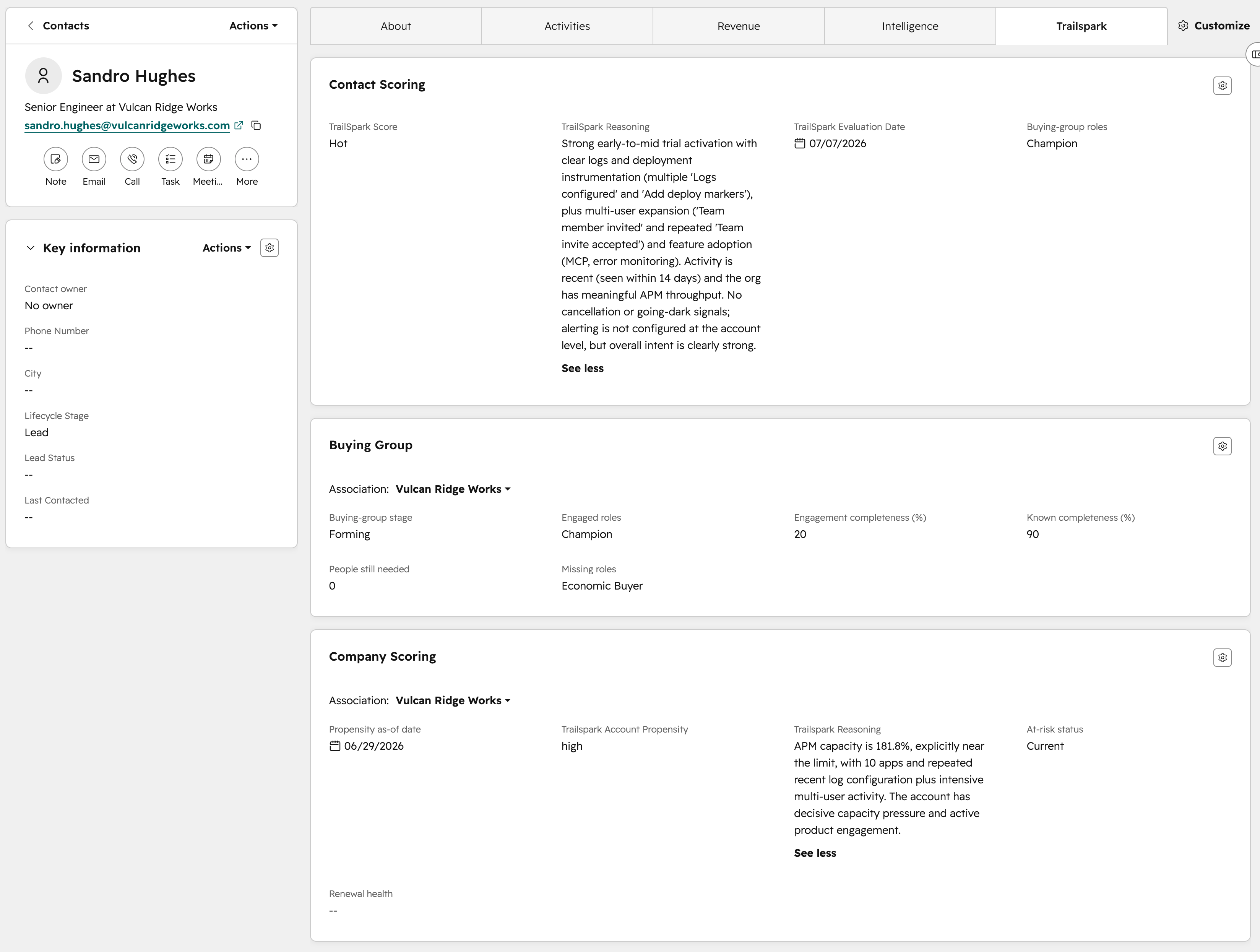
Next, create the necessary person-level and account-level fields in your Hubspot or Salesforce CRM to map Trailspark's evaluation and reasoning outputs to.
"The reasoning fields are written in natural language so your reps don't have to deconstruct a score to tell the difference between a '78' and an '82' account score."
The person-level record carries that contact's score, the reason behind it, which lens produced it, and the buying-group role they appear to be playing. The account-level record carries the account's propensity, its own reasoning, which roles are engaged, which are missing, and how complete the committee looks.
That's the setup. Now let's see how to use it in practice.
Before the call: walk in already briefed
The best prep happens ten minutes before you join, when there's still time to do something with what you learn.
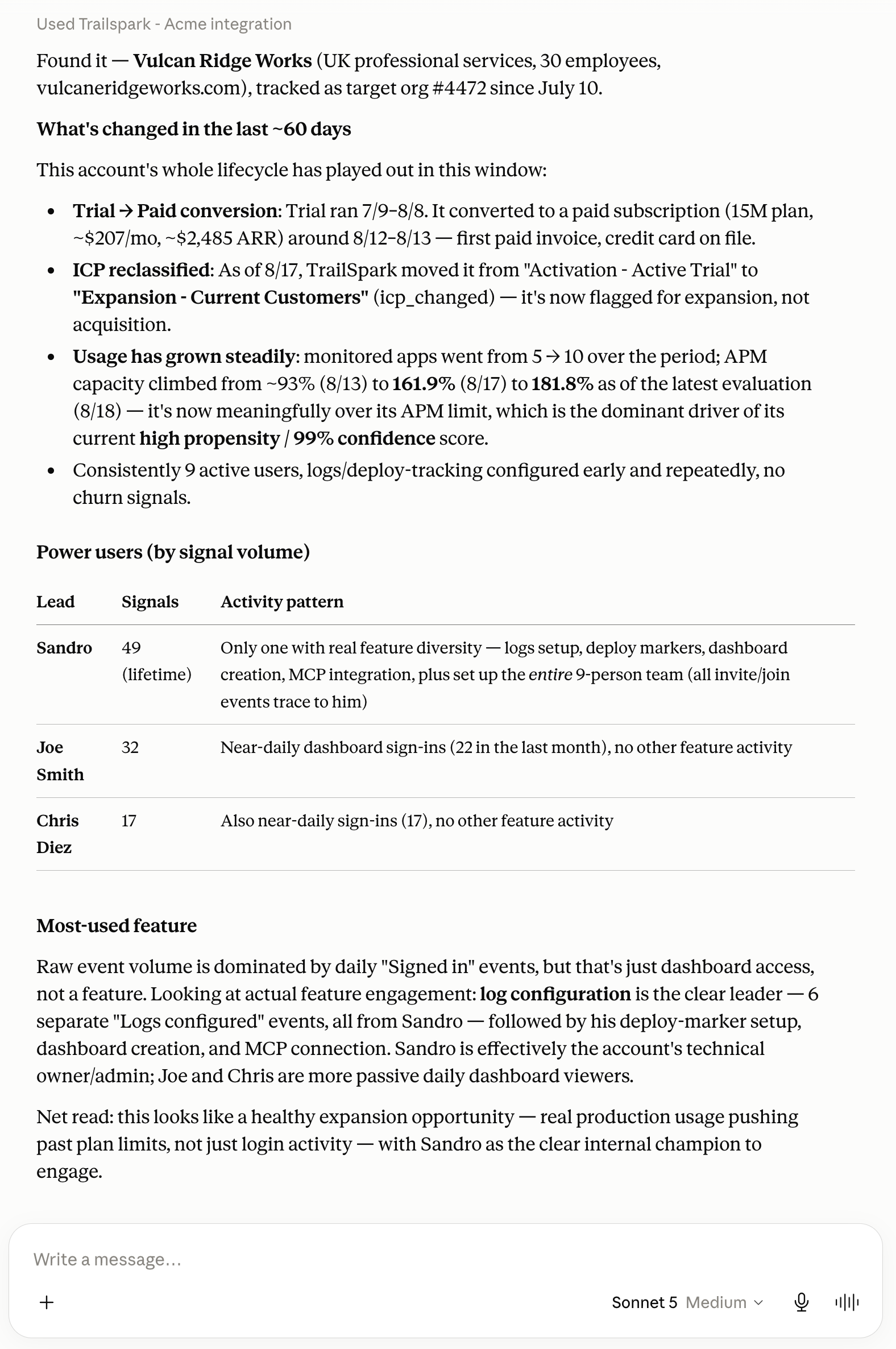
Trailspark allows you to converse with your account data through the MCP server. Simply connect it through ChatGPT or Claude and start your preliminary research:
"Find the account for this [company]. What's changed in the last 60 days? Who are the power users showing the most activity? What is their most used feature?"
The MCP can reference the raw signal history and reasoning behind all the accounts and leads it evaluates. Quick analysis at your rep's fingertips.
Pro tip: Do this before you join rather than during. Waiting on an assistant and trying to read the response while someone is mid-sentence is worse than not having one at all. Use this for quick research and CRM data for reference during the call.
During the call
Your reps keep the CRM record open and reference during the call. The great part about this is that you can customize the view in Salesforce or Hubspot to group the Trailspark data together so the rep doesn't have to hunt for it.
In HubSpot, admins manage this under Record Customization. You can go further than reordering the sidebar and give Trailspark its own tab on the record, sitting alongside About and Activities, with the evaluation and buying-group cards grouped inside it. One click and the rep has everything in one place.
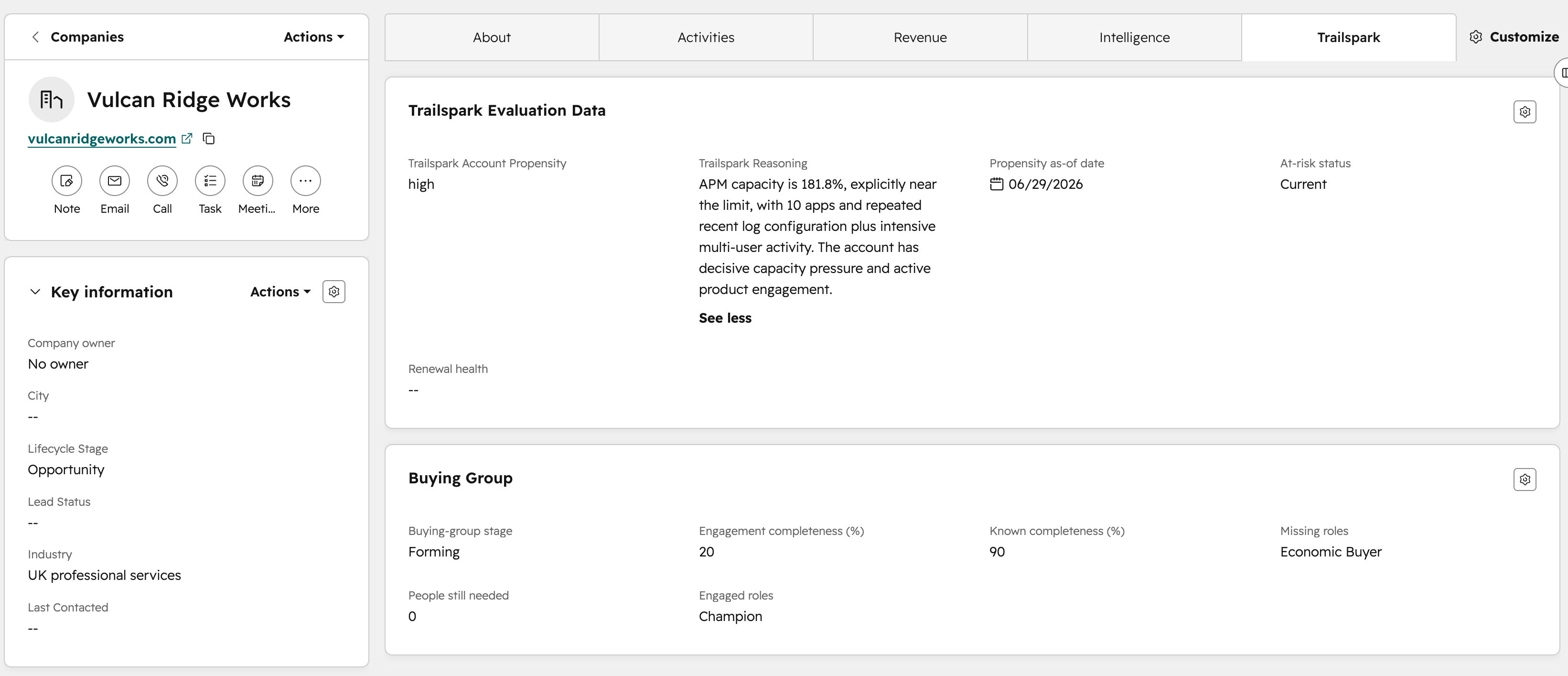
In Salesforce, the compact layout drives the Highlights Panel at the top of the record page. You get up to ten fields, with roughly the first seven rendering in Lightning depending on screen width. Build a custom compact layout, since the system default can't be edited.
Either way, put propensity and the written reasoning at the very top. Everything else on the record can stay where it is.
What this changes about the first ninety seconds
You can also use the information from the research phase to ask about missing buying group roles that Trailspark surfaced.
After the call: close the loop while it's warm
If you're using Zoom or Granola to transcribe your calls and take notes (and why wouldn't you be by now?), the call just produced a new artifact that you can immediately put into action.
Trailspark can tell you an account went quiet in the product three weeks ago. The transcript can tell you the champion mentioned a reorg on the last call. Neither is the full story alone, and the combination explains the account in a way that no single source does. Use that data to be proactive and determine who you might need to bring into the conversation from that reorg.
You could take it a step further and point an agent at both the Trailspark data and the meeting transcription to help facilitate this. Trailspark's MCP endpoint for the evaluation and the buying group, your CRM for deal state and history, and your transcript tool for what was said. Ask it to produce a short status per account, refreshed weekly.
For sales leadership, that's a pipeline review that writes itself, grounded in evidence rather than rep optimism. For the rep, it's a standing brief on every account they own.
Tune what gets delivered
A few settings control how much shows up, and knowing them lets you dial the experience to what your team wants.
Score tiers decide which accounts get pushed. The default is deliberately conservative and sends your hottest accounts only. Widen it when you want warm accounts reaching reps too, which most teams do once they've seen this working.
Buying group push adds the role and coverage fields. Turn it on and each contact carries the role they appear to be playing, which is what lets a rep tell the champion from the security reviewer before anyone speaks.
Create if not found decides what happens when a meeting attendee has no CRM record yet. Turning it on is especially valuable in a product-led motion, where a good share of the buying group arrived through the product and never filled out a form. This is the setting that gets those people onto the record in the first place.
Every destination keeps a push log per record, so you can always see what was written and when.
Quick-Start Checklist
- Connect one signal source - Product events or your CRM. Confirm signals are landing before tuning anything else, since everything downstream reads from them
- Write your first description - Pick one motion, describe a good account in plain sentences, and have a rep who sells that motion read it back to you
- Add a second lens - Renewal or expansion is the usual next one, and the moment the two disagree about an account is the moment this gets interesting
- Create your CRM fields - Person-level and account-level, with a long-text field for the reasoning at each level
- Map both levels - Score, reason, scoring lens, and role on the person. Propensity, reason, roles engaged, and roles missing on the account
- Set your delivery preferences - Score tiers, buying group push, and create-if-not-found
- Preview, then enable - See exactly what would be written before it is
- Move the reasoning to the top of the record - HubSpot record customization, or a custom Salesforce compact layout
- Hand one rep a read-only agent credential - Have them use it before a call and again after, then tell you which one they'd keep
Start with one motion and one rep. It sells itself from there, and the second lens takes a fraction of the time the first one did.
What to Read Next
For the thinking behind evaluating the account rather than the individual, Account Scoring vs Contact Scoring covers why the account is the right unit for B2B and how contact-level signals feed it.
The 2026 Guide to AI Lead Scoring walks through the wider framework, from defining your outcome to choosing signals and evaluating tools.
And Why Rules-Based Lead Scoring Breaks Down goes deeper on why a written reason is the thing that gets a score used.
Cover photo by Steven Kamenar (opens in a new tab) on Unsplash (opens in a new tab)